From Engadget · Filipe Espósito · · 1m 30s
A popping trackpad means stop typing now
A trackpad that pushes up from underneath is your laptop's battery telling you it is swelling, and it can catch fire.
In brief
A trackpad that pushes up from underneath is your laptop's battery telling you it is swelling, and it can catch fire. If your trackpad bulges or your case looks warped, power the laptop down, unplug it, and take it to a repair shop instead of using it. Originally reported by Engadget.
Flat trackpad, suddenly not

Modern trackpads sit flush. If yours starts lifting like something is pressing from below, or the glass cracks, that is a warning sign and not a cosmetic quirk.
“as if something were pushing it from the inside”
What goes wrong inside
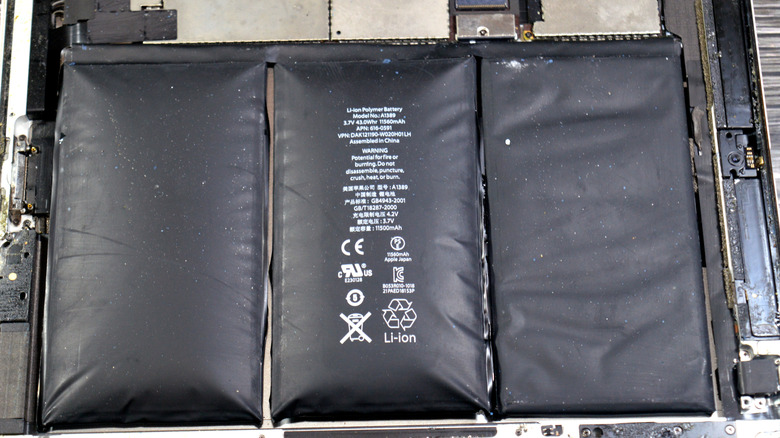
Laptop lithium-ion cells are safe in normal use. Overcharge or physically damage one and the chemical reactions inside start producing gas.
The battery sits right there

On most laptops, including MacBooks and Surface models, the battery lives directly under the trackpad. Swelling cells have nowhere to expand except up through it.
“Apple already had to launch replacement programs for MacBooks with swollen batteries”
Fire is the real risk
A dead laptop is the mild outcome. A swollen battery can rupture and burn, so a loose trackpad is worth checking even if a stray screw or a drop could explain it.
“The risk of it bursting into flames is very real”
Shut it down, hand it over
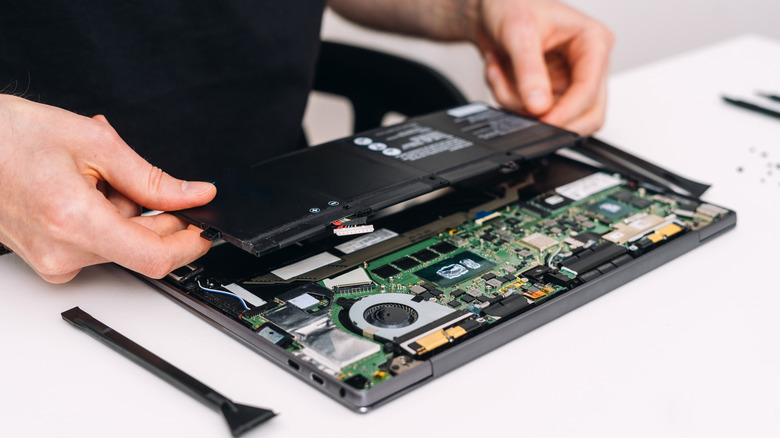
Turn the laptop off and unplug it. One wrong move while prying at a swollen cell can start a fire, so let a repair shop do the work.
What a fix costs
A new battery usually snaps the trackpad back into place. Apple charges $149 to $249 depending on model, and most makers repair a bad battery free under warranty.
At a glance
If your trackpad bulges or your case looks warped, power the laptop down, unplug it, and take it to a repair shop instead of using it.





