From TradingView · · 1m 20s
A Finviz style chart layout, rebuilt in TradingView
A swing trader ported the Finviz screener look onto a live DELL chart and published it for anyone to copy.
In brief
A swing trader ported the Finviz screener look onto a live DELL chart and published it for anyone to copy. Published chart layouts are shortcuts: one click grabs someone else's whole setup, but the layout is a view, not a recommendation. Originally reported by TradingView.
Finviz look, live chart

jordandodds published a DELL chart layout styled after the Finviz screener, so the familiar screener view becomes something you can actually trade from.
Built for swing trading
The setup targets US equities on a swing timeframe, days to weeks, not intraday scalping. The indicator choices follow that holding period.
“US Equities swing trading layout - inspired by finviz screener.”
Dell is the test case
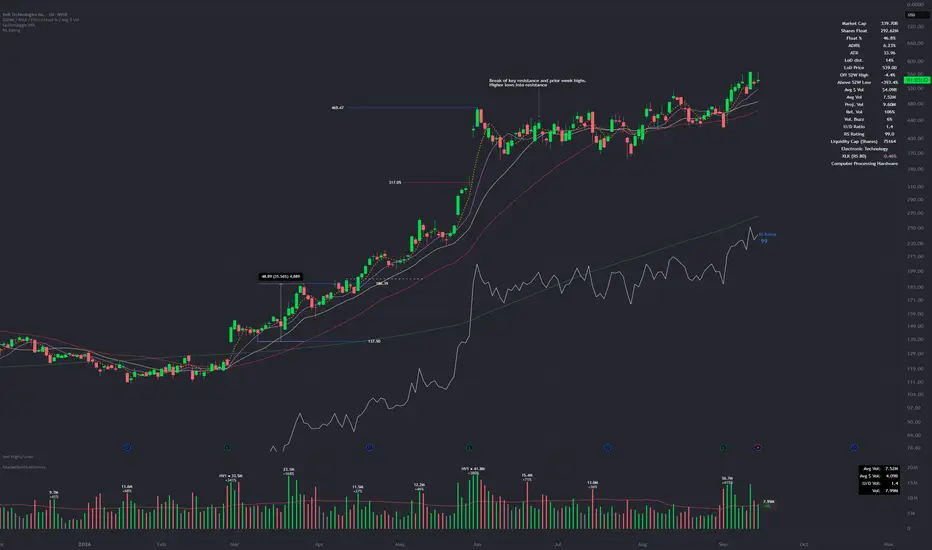
It runs on NYSE:DELL, so you can see how the layout reads on a real large cap before pointing it at your own watchlist.
Made on request
The note credits one person by name. Giankom asked for it. That is how most TradingView layouts spread, one trader builds it for another and publishes the result.
“Made for Giankom.”
Copy it in one click
TradingView's grab button clones the whole layout, indicators and all, onto your own chart. No rebuilding it setting by setting.
“Grab this chart”
A layout is not advice
TradingView attaches a standing disclaimer to every published indicator. A template shows you structure and framing. It does not tell you what to buy.
“The information and publications are not meant to be, and do not constitute, financial, investment, trading, or other types of advice”
The one thing
Published chart layouts are shortcuts: one click grabs someone else's whole setup, but the layout is a view, not a recommendation.