From The Verge · Dominic Preston · · 3m
Googlebooks feel like the first laptops built for Android owners
Google's new laptops run Android natively and sync seamlessly with your phone, but they need killer apps to justify their $900+ price tag.
In brief
Google's new laptops run Android natively and sync seamlessly with your phone, but they need killer apps to justify their $900+ price tag. Googlebooks finally deliver the Android-to-laptop integration that Chromebooks promised, but their success depends on whether developers build desktop-class software for them…
Google's pitch for Googlebooks
Googlebooks do for Android phones what MacBooks do for iPhones. You can start an app on your phone and pick it up on the laptop, access your phone's files, run any phone app on the computer, and manage notifications in one place.
“work seamlessly with your Android phone”
Five manufacturers launching Googlebooks
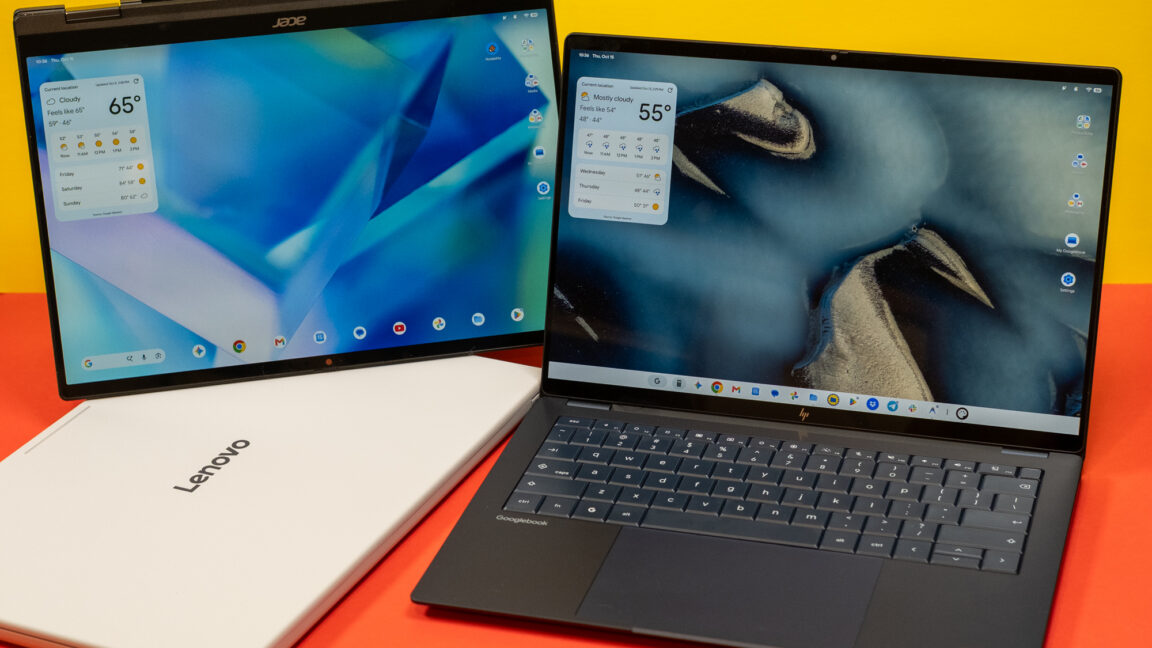
Lenovo, Dell, HP, Acer, and Asus are the first five companies building Googlebooks. The reviewer spent a couple of hours testing early versions from each manufacturer.
Setup syncs everything automatically

When you set up a Googlebook, you link your Google account and Android device. The laptop syncs your contacts, passwords, settings, and payment details just like switching between Android phones.
Googlebook OS blends Android and ChromeOS

Googlebook OS is built on Android's codebase but uses a Chromebook-like layout with Android's Material 3 design language from Pixel phones. Widgets and the notification tray look identical to Android, just scaled up for a larger screen.
Notifications sync across devices
Connect a Googlebook to your phone and notifications appear on both. Dismissing or reading a message on one device automatically updates the other. You can also send inline replies to texts from the laptop.
File browsing works like a second drive
The Googlebook file browser lists your paired phone as a hard drive. You can browse, open, edit, and copy files directly without uploading to Google Drive or emailing attachments.
Continue On lets you switch apps between devices

An Android 17 feature lets you start an app on your phone and pick it up on your laptop. You can also open any phone app from the laptop's app drawer, which casts it in a portrait window on the bigger screen.
Android 17 requirement limits early adoption
Continue On, app casting, and file browsing all require Android 17, which currently runs on most Pixels and a handful of flagships from Samsung and other makers. Android's fragmented updates will slow initial Googlebook demand.
Ten years of software support promised
Google promises Googlebooks will receive software updates for 10 years, longer than most phones last. Core features should keep working even if your phone software falls behind.
Android apps run natively without emulation

Because Googlebook OS runs on Android's tech stack, it can run any Android app from the Play Store without emulation. Netflix, Disney Plus, and HBO Max support offline downloads, a feature unavailable on most other laptops.
App confusion could frustrate users
Some apps run in small phone-shaped windows, others scale for the big screen, and some have desktop versions. Some support Continue On handoff, most don't. The Play Store will use tags to help users find apps optimized for Googlebooks.
Missing desktop software is a major problem
Googlebooks lack desktop versions of key apps like Adobe Photoshop and Lightroom. At $900 to $1,299, they compete with MacBook Air, but without the software ecosystem. Success depends on developers building desktop-class apps.
The reviewer's verdict: hopeful but waiting

After a decade waiting for a laptop that maximizes Android integration, the reviewer left Google's briefing almost convinced. Googlebooks look built on Android as much as for it. Desktop-class software rollout will determine whether they succeed.
“I want to believe.”
What matters most
Googlebooks finally deliver the Android-to-laptop integration that Chromebooks promised, but their success depends on whether developers build desktop-class software for them.